Author: aabdelfattah

  • الحاجة سواقة التاكسى

    تاكسى


    اعذرونى على البوست الطويل .. قصة لازم تتحكى (بتصرف) 🙂

    النهاردة كنت نازل متأخر الصبح قلت أوقف تاكسى … ضربت بعينى كدة ع السواق لقيتها حاجة كبيرة فى السن لابسة عباية استغربت .. بس قلت و ماله ما هى البنت زى الولد ما هياش كمالة عدد .

    – الجبل الأحمر يا حاجة ؟

    – ماعرفوش ده يابنى .

    – طب تعرفى نادى السكة ؟

    – أيوة .
    – على بركة الله ..

    – مش فى ريحة شياط يا حاجة ؟؟

    – ايوة يابنى مش عارفة العربية مالها بتكركر من الصبح ..

    – مممممممممم …. طب شدى حيلك يا حاجة احنا ماشيين على 20 و لا ايه ده لو خدتها مشى كان زمانى وصلت 😀

    و فجأة سواق تاكسى تانى بيزمر بصوت عالى جنبنا و بيلطم بهيستيريا و بينعر بفظاظة : الكاوتش بيطلع شياط .. نزلى الهاند يا حاجة !! أنتى بتتعلمى و لا بتعلميه و لا أيه .
    – لأ باعلمه 😀
    – هاااااار أسود 😀 … بتعلمينى ايه بس يا حاجة 😀

    – يابنى والله أنا متعلمة كويس بس هى سهوات كدة
    – سهوات ايه بس .. ده احنا مش باينلنا هنوصل النهاردة .. احكيلى ايه بس اللى رماكى على المر ده ؟

    – واللهى يابنى أنا كنت شاطرة فى الخياطة جبت مكنة خياطة و المكنة جابت مكنة .. ربنا فتح عليا و جبت تاكسى .. شغلت 2 سواقين عليه بس نصبوا عليا .. و أنا صغيرة خالى كان بيسيبلنا مفاتيح العربية نسخنها و نغسلها فاتعلمت سواقة .. و ادينى وصلت زى مانت شايف كدة (و ضحكت 🙂 ) …. اللى بيزعلنى يابنى أن السواقين الرجالة بيزنقوا عليا عشان يخطفوا الزباين رغم أنهم شايفين أنى واحدة ست … كل واحد رزقه مقسوم و لو مكتوبلك النهاردة عشرة جنيه مش هتاخد أكتر منها ولا أقل منها … اللى بيزعلنى بس التصرف .
    – اه والله عندك حق … و نعمة بالله (ييجى البغال اللى قاعدين ع القهاوى و النواصى يشوفو)

    – هنا يابنى .

    – أيوة على جنب .

    – هو ده الجبل الأحمر ؟

    – لأ ده اسمه الحى السادس .. الجبل الأحمر المنطقة العسكرية اللى قدامك دى .

    – (اتخضت … و بعد كدة وصلة مدح) .. الجيش ده أحلى حاجة فى البلد يعنى التزام و انضباط .. مسئولية و …. الحاجة الوحيدة اللى شغالة فى البلد .. و شغالين فى الدواجن و المواشى و عندهم مزارع و كل حاجة .. و وطنية تلاقى فيها أنضف حاجة و أرخص حاجة كمان ..

    – ما خلاص يا حاجة انتى هتعملى اعلان زيت الحلوة .

    – نهارك أبيض 🙂

    – سلامو عليكو (دى بلد وسخة اللى تبهدلك كدة … اه والله)

  • OpenTLD Object tracking on Raspberry PI

    OpenTLD (Tracking-Learning-Detection ) is an object tracking algorithm originally developed in MATLAB by Zdenek Kalal, the novel feature of the algorithm is the decoupling between the tracking and the detection algorithms unlike many algorithms where the tracking depends on the detected features of the object. This decoupling allowed the OpenTLD to outperform many algorithms.

    You can find more info about the algorithm and Kalal here.

    TLD has been released under GPL v3.0 allowing the open source community to invest more efforts in the algorithm, Georg Nebehay released a complete C++ implementation of OpenTLD relying on the powerful OpenCV library and based solely on open source libraries.

    Find more info here and src code here.

    What’s cool about Georg’s implementation is using cmake (cross-platform make) as a build system for the project allowing compiling over windows and linux easily, so here’s what you have to do to get OpenTLD working on the Raspberry Pi

    • Install the dependencies
      •  OpenCV
      • CMake
      • libconfig++ (optional)
      • Qt4 (optional)

    $ sudo apt-get install libopencv-*

    $ sudo apt-get install cmake

    • Download the OpenTLD source code and unzip it .
    • Generate the native linux makefile

    $ cd $OPENTLD
    $ mkdir ../build
    $ cd ../build
    $ cmake ../$OPENTLD -DBUILD_QOPENTLD=ON -DUSE_SYSTEM_LIBS=OFF

    • Navigate with the terminal to the build directory

     $ make  (builds the project)
     $ make install (builds and installs the project)

    That’s it , you are good to go . You will find opentld executable in bin/

    $ ./bin/opentld

    Update [16/12/2013]

    Just thought of posting some performance benchmarks ..

    Tracking + learning : ~ 0.8 fps

    Tracking only (switched off learning) : ~ 1.5 fps

  • Rooting and installing CWM on Samsung Galaxy S3 without Odin/Computer/USB connection

    Rooting and installing CWM on Samsung Galaxy S3 without Odin/Computer/USB connection

    Are you totally new to rooting Android phones ? Can’t fully understand the whole new terminology ? Finding Odin Confusing ?……

    Then this thread is for you !

    I am assuming you already did you research about rooting and you know all the risks involved .

    I am also assuming that you got stuck with some Odin errors like the Stuck at “Get PIT for Mapping” or any other issue , despite of this post I still recommend using Odin as it’s widely supported . Finally , I am not responsible for any damage that happens to your phone . This method worked for an S3 I9300 with Android JB 4.1.2. 

    Now after you have been lectured with the usual warnings and recommendations it’s time for action :

    FIRST STEP : Downloading and installing Farmaroot.apk

    Farmaroot is a tool that uses software workarounds to root the phone without having to flash a custom ROM.

    1 – Download Farmaroot-1.6.0

    2- Connect your phone to the PC and copy Farmaroot-1.6.0.apk to your sdcard .

    3 – Install Farmaroot (make sure you checked installation from untrusted source from the security settings) .

    4-  Run the app , choose “install Superuser”  option inside Framaraoot and Select any of the exploits that appears in the app and wait for some time(sam worked for me) .

    • If you get a “Success  … Superuser and su binary installed. You have to reboot your device” then you have successfully rooted your phone .

    5- you can ensure that your phone is rooted by downloading the root checker from the app store.


    SECOND STEP : Flashing the Clockworkmod recovery.

    1- Now you have your phone rooted you can simply install CWM using the ROM manager app from the play store which fully supports the i9300 . Run Rom manager and follow the steps to flash the CWM.

    2- Reboot your phone in recovery (by pressing Home + power + vol down buttons) and you will get the CWM recovery screen ..


    That’s it ! Congrats !


  • How to install Ubuntu 12.04 over Fedora 17 keeping Windows 7 dual boot

    I have spent a few days playing around with different boot scenarios to remove Fedora and install Ubuntu but keeping dual boot with Windows 7 intact and here is the juice of my experience 🙂

    * If you are booting from USB live disk make sure to disable UEFI from BIOS options and run in legacy mode (sometimes referred as CSM)

    Method 1

    1 – Use Disk Management from Windows  (Run -> diskmgmt.msc), find the Fedora partitions, delete them and format but this will delete GRUB and you will not be able to boot hence you need to restore MBR.

    2 – To restore the MBR using Ubuntu live CD you should simply install lilo

    sudo apt-get install lilo

    sudo lilo -M /dev/sda mbr

    3 – Then you can install Ubuntu normally alongside with windows using the installer which will be able to automatically detect  Windows 7 installation.

    This should be the perfect scenario but actually this is not what really happened to me during my trials,

    What happened to me is that I damaged the MBR by accident so I got the error

    BOOTMGR is missing.

    after rebooting the machine.

    Method 2

    So I plugged in the ubuntu live usb disk -> install and when asked where to install I chose something else then I chose the 2 Fedora partitions as the installation partitions and checked the option to format them

    /dev/sda1 -> /boot

    /dev/sda2 -> /

    Ubuntu installation automatically fixed MBR and installed GRUB and now I can happily dual boot Ubuntu 12.04 and Windows 7 🙂

    So I guess this is a second and an easier  method to install Ubuntu >= 12.04 over fedora just by using the live disk and choosing fedora partitions as Ubuntu installation partitions.

  • البت كوينز .. العملة الرقمية الرسمية لتجارة المخدرات

    فى الأسابيع القليلة الماضية قامت السلطات الأمريكية بمصادرة 144,336 بت كوين بما يعادل قيمة 28 مليون دولار أمريكى من جهاز كومبيوتر ينتمى لصاحب موقع سيلك رود الألكترونى الذى يعد بمثابة السوق المزدهرة لتجارة المخدرات و الأنشطة الغير قانونية الكترونيا .


    اذا ماهى قصة البت كوين ؟ و ما قصة سيلك رود ؟

    فى نوفمبر 2008 قام ساتوشى ناكاموتو بنشر ورقة بحثية تحت مسمى : ” البت كوين : نظام النقد البير تو بير الالكترونى” حيث قام باقتراح نظام نقدى الكترونى جديد يمكن استخدامه فى عمليات الشراء و البيع على الانترنت و لكن الجديد فى هذه النظام هو أنه “مفتوح المصدر , تصميمه غير حصرى أو سرى بل معلن للعامة مما يوفر درجة أعلى من الثقة , لا أحد يمتلك أو يتحكم فى البت كوين و لكن كل المساهمين يؤدون دورا “

    [youtube=”http://www.youtube.com/watch?v=Um63OQz3bjo”]

    اذا قمت بتحميل ملفات تورنت من قبل فانت بالتأكيد سمعت عن البير تو بير حيث تقوم نظرية عمل تحميل ملفات التورنت على اشتراك جميع الأجهزة التى أكملت التحميل برفع الملفات لنظيراتها الذين لم يقوموا بتحميل الملف بعد , فلا يوجد سيرفر مركزى يقوم بتخزين الملف و يمكن التحميل منه بطريقة مباشرة و لكن الكل مشارك فى التخزين و الرفع . تقوم عملة البت كوين على نفس النظرية تماما و لذلك هى تعد أول عملة الكترونية لا مركزية مما يمنحها بالتأكيد العديد من المميزات لأن المعاملات تتم مباشرة بين الأفراد بدون وجود وسيط

    – مما يخفض من تكلفة التحويل بشكل كبير

    – لا يمكن أن تتعرض لتجميد حسابك

    – من الممكن أن تستخدم البت كوينز فى جميع انحاء العالم بدون اجراءات ادارية مملة 


    سيلك رود

    كأى ابتكار جديد له جوانبه السلبية فان السرية المطلقة التى اتاحتها منظومة البت كوين للمستخدمين أتاحت قيام أسواق سوداء الكترونية تحمى هوية البائع و المشترى تقوم بتجارة كل ما هو غير قانونى بداية بالهيروين مرورا بالأسلحة و حتى يمكنك أن تستأجر قاتل محترف أو هاكر محترف لاختراق احد أكونتات تويتر أو فيسبوك  !  

    فى الفترة من فبراير 2011 حتى يوليو 2014 تمت حوالى مليون و ربع المليون معاملة ناجحة تضمنت ربحا حوالى 9 مليون و نصف المليون بت كوين بما يعادل ما يقرب من 2 مليار دولار أمريكى , و بالرغم من كونه سوقا لتداول المنتجات الغير قانونية فان نجاح سيلك رود أثبت أن البت كوين منظومة تداول ناجحة و يمكن تعميمها أكثر لتحتل مساحة واسعة فى النظام النقدى العالمى

    خاتمة

    يدعى المتحمسون لمجتمع بت كوين أنها ستقوم بتغيير النظام البنكى العالمى بنفس الطريقة التى غير بها الانترنت وجه الكوكب . فهل تظن أنهم على حق ؟؟
    يمكنك التجربة و الحكم بنفسك


    مصادر

    http://gadgets.ndtv.com/internet/news/28-million-in-bitcoins-seized-from-silk-roads-ross-ulbricht-438465

    http://en.wikipedia.org/wiki/Bitcoin

    http://bitcoin.org/bitcoin.pdf

    https://www.weusecoins.com/en/


  • اخيرا …البشر ينتقلون للعيش على المريخ

    منذ القدم راود البشرية حلم التحليق إلى اﻷعلى لينتقل خارج حدود اﻷرض و يقوم بسبر أغوار الكون, قمنا باتخاذ أول خطوة على سطح القمر فى عام 1969 .

    و الان نحلم باتخاذ نفس الخطوة و لكن ………… على المريخ !

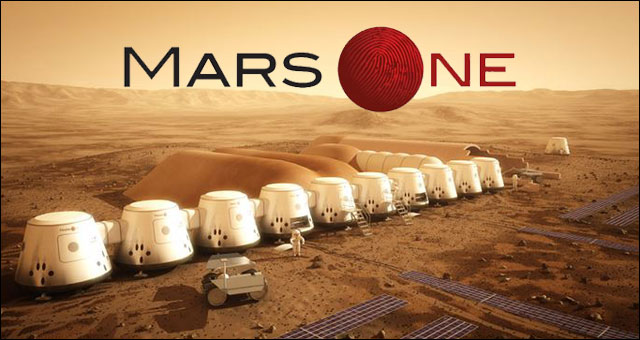
    Mars_One

    خلفية تاريخية

    محاولات البشر لاستكشاف المريخ قديمة , كانت أول محاولة قام بها السوفيت فى عام 1960 و لكن فشلت مرحلة الاطلاق و استمرت المحاولات حتى كانت أول محاولة ناجحة من نصيب مركبة مارينر 4 اﻷمريكية فى عام 1964 التى استطاعت تصوير سطح كوكب المريخ ﻷول مرة فى تاريخ البشرية ثم توالت الرحلات حتى استطاعت وكالة ناسا الفضائية انزال عربات يتم التحكم فيها من بعد على سطح المريخ أخرهم عربة كيروسيتى روفر التى استطاعت الهبوط بنجاح فى اغسطس 2012 .

    جدول توضيحى من ويكيدبيديا للرحلا الفضائية الى المريخ من 200 حتى اﻷن

    جدول توضيحى لمهام المريخ الاستكشافية منذ عام 2000 : المصدر ويكيبديا

    مارس وان

    في عام 2011 اجتمع الأعضاء المؤسسين لفريق مارس وان معا لوضع خطة استراتيجية لأخذ الإنسانية إلى المريخ. أسفرت تلك السنة الأولى الانتهاء عن  دراسة الجدوى، ودعوة خبراء من وكالات الفضاء وشركات الفضاء الخاصة في جميع أنحاء العالم و انشاء منظمة مارس وان الهولندية الغير هادفة للربح  .قام المؤسسون لمنظمة مارس وان بدراسات متعمقة مبنية على جلسات مع متخصصين فى مجال الفضاء وخطتهم تعتمد على تكنولوجيا متوفرة حاليا فى شركات الفضاء و معامل اﻷبحاث للقيام بالرحلة و توفير وسائل الاتصال مع اﻷرض و انشاء مستعمرات مستدامة تعتمد على الزراعة و الطاقة الشمسية بحلول عام 2023 .

    [youtube=http://www.youtube.com/watch?v=74pA5YH]

    وتتكون الخطة من ارسال بعثات البضائع لاعداد مستعمرات قابلة للسكن و المعيشة ، يليه هبوط الإنسان.

    في السنوات المقبلة، سيتم إرسال بعثة تجريبية، أقمار  الاتصالات، عربتان روفرز وعدة بعثات للبضائع إلى المريخ. وستكون مهمة  هذه البعثات إنشاء البؤرة الاستيطانية حيث سيعيش الطاقم  و سيأخد تصميم المهمة فى عين الاعتبار التوسع في المستعمرة  حيث يصل طاقم جديد كل سنتين. بدأ البحث عن رواد  .الفضاء في ابريل 2013. و قام أكثر من 78،000 شخص بالتسجيل لبرنامج الاختيار فى غضون أسبوعين من إطلاقه

    الجدول الزمنى

    2013
    • اختيار 40 رائد فضاء
    • البدء بالتدريب عن طريق محاكاة المستوطنة المريخية
    2016
    • اطلاق المهمة التجريبية و قمر الاتصالات
    2018
    • اطلاق مهمة عربات روفر للاستطلاع و تهيئة منطقة مناسبة لهبوط الامدادات و الوسائل المعيشية
    2021
    • جاهزية القاعدة المريخية اﻷولى التى تتكون من 6 وحدات اعاشة و عربتان روفر للاستطلاع
    2022
    • انطلاق رحلة الطاقم اﻷول
    2023
    • وصول الطاقم البشرى اﻷول المكون من رجلين و امرأتين إلى المريخ !
    2025
    • وصول الطاقم الثانى

    marsoneinfographicskopi

    تأمل الشركة الهولندية أن الانسان سيكون قادرا على العيش على سطح المريخ بحلول عام 2023 …فهل نفعلها ؟؟؟

    منظمة مارس وان Mars One- 

    عن الفريق- 

    الرؤية و المهمة- 

  • Have You Heard about the Li-Fi ?

    Many of us know the Wi-Fi, it’s the way that our laptops, tablets and smartphones communicate with each other and connect to the internet at our home. But have you heard about the Li-Fi ?

    In this interesting TED talk , Harald Haas raises an interesting question :

    What if every light bulb in the world could also transmit data?

    [youtube=http://www.youtube.com/watch?v=NaoSp4NpkGg]

    Li-Fi technology depends on tx of data using LED light bulbs. Haas describes it as :

    At the heart of this technology is a new generation of high-brightness LEDs. Very simply, if the LED is on, you transmit a digital 1, if it’s off you transmit a 0. They can be switched on and off very quickly, which gives nice opportunities for transmitting data

    The new emerging technology has many advantages like using a free bandwidth, higher security as light doesn’t penetrate walls, high data rates (claimed to reach 3 Gbps)  and is expected to be cheaper and more efficient than Wi-Fi but on the other hand you need a direct line of sight with the transmitter and even with a direct line of sight the receiver is susceptible are to interference with other light sources like the sun and normal light bulbs .

  • قصة اسلام ملحد من المانيا

    مسجد السلطان حسن

    تعديل 31/12/2016 : أنا مدرك كويس أن السطور التالية فى شبهها كتيرعلى كل مواقع وصفحات الدعوة و أن شيوخ كتير حكوا نفس القصة بتفاصيل قريبة جدا من التفاصيل اللى هنا فى حلقات على اليوتيوب و قنوات اسلامية و أنا عارف أن من تكرارها بقى الواحد بيميل أنه ما يصدقش القصص من النوع ده (أنا نفسي كدة) لكن الفارق الوحيد اللى أقدر أوعد بيه أنى ما حضرتش محاضرة لشيخ بيقول الكلام ده أو شفته فى حلقة على الانترنت و طبعا بما انك غالبا ما تعرفنيش فأنا مش هاطلب منك تصدق و احتمال وارد أني أكون مألف كل ده من دماغي زي أى هري موجود على الانترنت و لكن اللي أقدر أقوله أنا حضرت الموقف شخصيا و سمعت الرجل بيحكي قصته بوداني و كل اللي عملته أني ترجمت كلامه إلي العربية لأني حسيت أنه محتاج يتوثق في مكان ما .

    عادة ما أصلى الجمعة  فى مسجد السلطان حسن  , بينى و بين هذا المسجد علاقة خاصة,  أشعر فيه بالراحة و الهدوء . الروتين الأسبوعى لصلاة الجمعة هى الخطبة ثم الصلاة تليها خطبة قصيرة اسبوعية يلقيها شيخ المسجد و تكون مرتبطة غالبا بالأحداث الجارية و لكن هذه الجمعة كانت مختلفة , جمعة الخامس من ابريل ,بعد انتهاء الصلاة أعلمنا شيخ المسجد أن فى هذا اليوم المميز حضر معنا الصلاة ضيفان كريمان , الأول من الولايات المتحدة الأمريكية و الثانى من المانيا , سيقوم الضيف الثانى الذى أعلن اسلامه بحكاية قصة دخوله فى الاسلام أما الأول فسيقوم  باشهار اسلامه أمام الحضور .

    ابدى المصلون اهتماما و همة و تزاحموا للاقتراب من المنبر ليستمعوا لحكاية هذا الرجل القادم من الغرب , ألقى المرافق المصرى للمسلم الألمانى كلمة قصيرة تحدث فيها عن مضمون القصة و مايجب استخلاصه منها وهو ما سنتحدث عنه لاحقا (كان يصحب الرجل مرافقين أحدهما يقوم بالترجمة و الثانى هو من قام بالقاء الكلمة القصيرة) ثم ناول الميكروفون للمسلم الألمانى “يوسف السعيد”  ليحكى قصته الغريبة ! هذه القصة التى لو لم أسمعها و أرى الرجل بأم عينى(و لقد تم توثيقها بالفيديو و أتمنى أن ينشر قريبا على صفحة المسجد الالكترونية) و هو يحكيها لظننت أنها قصة من قصص الفيسبوك الخيالية التى  تنتهى دائما ب  انشرها استحلفك بالله و لاتخرج قبل أن تقول سبحان الله

    هذه القصة التى لو لم أسمعها و أرى الرجل بأم عينى و هو يحكيها لظننت أنها قصة من قصص الفيسبوك الخيالية التى تنتهى دائما ب  انشرها استحلفك بالله و لاتخرج قبل أن تقول سبحان الله

    شرع ” يوسف السعيد “ فى حكاية قصته مع الاسلام :  أنا رجل من المانيا أعمل بالتدريس , حظيت بأم رائعة و زوجة حانية و عائلة محبة و وظيفة مستقرة , كانت حياتى سعيدة مرتاحة تقل فيها المنغصات و  المكدرات و لكنى دائما كنت أشعر بأن هناك شيئا ناقص , كنت أحس بوجود خلل فى حياتى و لكن أجهل ماهيته. سمعت عن شواطىء مصر الخلابة و قررت أن أقضى اجازتى السنوية باحد شواطىء البحر الأحمر . أثناء تمشيتى على الشاطىء مع زوجتى فى وقت الغروب , استوقفنى مشهد بديع لقرص الشمس البرتقالى و هو يهبط كأنه ممتزجا بالمياة الزرقاء الصافية الممتدة . قررت أن التقط صورة لهذا المشهد الخلاب , نظرت زوجتى إلى الصورة التى التقطتها و نبهتنى أن فى منتصف الصورة تماما هناك رجل يصلى (كان فى وضع السجود) , يبدو أنك لم تنتبه اليه لبعد المسافة , يجب أن نستأذنه , تحركنا ناحية ”  حسن” و استأذناه فى الاحتفاظ بالصورة فرد علينا باشراق قائلا : مش مشكلة ,المصريون و دودون مع الغرباء بشكل عام , حاولنا التواصل قليلا و لكن للأسف باءت محاولاتنا بالفشل لجهلى بالعربية و جهل .حسن بالانجليزية

     فى يوم لاحق التقيت بحسن مرة أخرى (هو كان عامل نظافة فى الفتدق الذى أنزل به)  ولحسن الحظ كنت بصحبة مدرب الغطس الذى قام فى هذه المرة بالترجمة و تسهيل التواصل بيننا , تحدثت مع حسن فى مواضيع شتى , تحدثنا عن مصر و المانيا و عن  العائلة , تحدثنا عن الحياة و عن الدين . لاحظت اعتزاز حسن و افتخاره الشديد بدينه ,تحدث عن فضل الاسلام و الراحة و السكينة التى يشعر بها, احسست بالتمييز , غضبت و قلت له أن الملحدين ايضا لهم الحق فى الحياة . فى اليوم التالى قابلت حسن و هو يؤدى عمله فى التنظيف بهمة , رأنى فاشار لى أن أقترب , ثم فعل أغرب شىء من الممكن تخيله , مازلت أتذكر كل تفاصيل هذه اللحظة و كأنى اعيشها الأن , قام حسن بالنفخ فى الهواء و أشار لى سائلا : ماذا ترى ؟؟ رددت عليه متعجبا : لا أرى شيئا . فامسك يدى و كرر النفخ فى راحة يدى و سألنى : ماذا تشعر الأن ؟؟ اجبته أشعر بسخونة الهواء الذى نفخته فى كفى , فرد كذلك هو الله ربى , لا اراه و لكن استشعر وجوده

    And he did the strangest thing ever, I still can remember this moment like it’s exactly happening now. I will never forget what he did.

    توطدت علاقتى مع حسن , و أصر على دعوتى لزيارته فى الأقصر لرؤية منزله و عائلته , انبهرت بالأقصر و تكررت زياراتى فاصبح لا يمر عام بدون أن أزور الأقصر و صديقى حسن , و فى أحد الأعوام   قررت أن أرد الدعوة لحسن و ادعوه أن يزورنى فى المانيا , استغرق مننا الأمر الكثير من الوقت و المجهود , كان يجب علينا انهاء العديد من الأوراق الرسمية و فى النهاية قامت السفارة الألمانية برفض الطلب المقدم منى لدعوة حسن إلى المانيا , شعرت بغضب شديد و كتبت خطابا شديد اللهجة إلى السفير الألمانى بالقاهرة و لكن لم يأتنى رد , لم استطع دعوة صديقى إلى منزلى لذا كنت أشعر باحباط شديد و لكن ما أثار اهتمامى أن حسن لم يكن يشعر الا بالرضا و لم أرى فى ملامحه الا الهدوء و السعادة , سألته : حسن , لماذا لا يبدو عليك الحزن ؟ فرد على : لأنى أشعر بالرضا  فسألته و لماذا تشعر بهذا الرضا ؟ فرد على : لأن المسلم يؤمن بالقضاء و القدر فقلت له و كيف يكون الانسان مسلما ؟ فاجابنى : انه أمر بسيط جدا , فقط عليك أن تقول أشهد أن لا اله الا الله و أشهد أن محمدا رسول الله . فى الحقيقة أنا لم أكن قررت أن أدخل الاسلام بعد , و لم أقرأ عنه الا القليل , لكنى شعرت فى تلك اللحظة برغبة جارفة فى أن أنطق بالشهادتين , شىء غامض داخلى كان يلح على و يدفعنى إلى أن أقولها . قلتها.  فتهلل وجه حسن و قالى لى : مبروك , أنت مسلم .

     سألته : حسن , لماذا لا يبدو عليك الحزن ؟ فرد على : لأنى أشعر بالرضا  فسألته و لماذا تشعر بهذا الرضا ؟ فرد على : لأن المسلم يؤمن بالقضاء و القدر فقلت له و كيف يكون الانسان مسلما ؟ فاجابنى : انه أمر بسيط جدا , فقط عليك أن تقول أشهد أن لا اله الا الله و أشهد أن محمدا رسول الله .

     فى هذه اللحظة قاطع شيخ المسجد يوسف السعيد , اعتذر على مقاطعتك و لكن يجب علينا أن نتحين هذه اللحظة الروحانية المميزة و الملائكة تحفنا , أخونا على من الولايات المتحدة لم يقم باشهار اسلامه بعد و سيكون أمرا رائعا أن تنطق بالشهادتين الأن يا على , تسلم على الميكروفون و ردد الشهادتين : أشهد أن لا اله الا الله و أشهد أن محمدا رسول الله .

    يقول رسول الله (ص) : “انما بعثت لأتمم مكارم الأخلاق” , لقد ذكر يوسف فى أثناء حديثه أن أكثر ما وطد علاقته بحسن و بالاسلام حسن أخلاقه و كرمه ” كان حسن شديد التمسك بدينه و يظهر تأثيره فى جميع تفاصيل حياته اليومية و لكنه رغم هذا لم يقم بدعوتى إلى الإسلام و لا مرة ”  , الحقيقة أن حسن كان يدعوه فى كل يوم و كل ساعة باخلاقه

    يقول الامام محمد الغزالى : ” ان المسلمين ظلموا دينهم مرتين , مرة بسوء التطبيق , و مرة بالعجز عن التبليغ ” 

    كم تحتاج أمتنا إلى 200 مليون حسن , كم أتمنى مقابلة هذا العامل البسيط الذى هدى الله على يده ملحدا فقط بحسن خلقه !!! كم أشعر بالأسف للضرر الذى نوقعه على ديننا و على الظلم الذى نظلمه لاسلامنا !

    يُضِلُّ اللَّهُ مَنْ يَشَاءُ وَيَهْدِي مَنْ يَشَاءُ

  • Building android-4.0.4 IceCreamSandwich on Pandaboard/Pandaboard ES

    This is the 2nd post about building Android for pandaboard. I quote from the previous post

    Google maintainers advise to always repo sync the master branch for panda claiming it’s the most stable , but in my opinion they should focus on stabilizing tags. Tags should represent a stable snapshot of he source tree to build and run . That’s what a tag means in Software Engineering anyway !

    This post is a translated version of the Japanese post on blog.sola-dolphin-1.net reposted under permission of the main author  that describes how to build Android JB tag android-4.0.4_r1.2 for pandaboard, of course some patching is required to get it work, you can download all the patches required from this mirror or follow the steps to get them one by one from the main mirror.

    android-4.0.4

    IMPORTANT: To compile ICS you need to be using gcc 4.4 , so you may downgrade your gcc version or just installing gcc/gcc++ 4.4 and specifying them while making.

    $ sudo apt-get install gcc-4.4 gcc-4.4-multilib g++-4.4 g++-4.4-multilib


    Then, override make’s default variables with

    $ make CC=gcc-4.4 CXX=g++-4.4 -j4

    – prepare the directory

    $ mkdir ~/panda_work
    $ export PANDA_WORK=~/panda_work
    $ mkdir ~/panda_work/android
    $ export ANDROID_ROOT=~/panda_work/android

    – init the repo

    $ cd $ANDROID_ROOT
    $ repo init -u https://android.googlesource.com/platform/manifest -b android-4.2.2_r1
    $ repo sync

    notes:

    1. to save time you can use an old tree and repo init inside it’s dir , then sync will grab only the differences
    2. in case repo sync hangs use repo sync -j1 to disable multi threading also check repo sync -h for other options

    – get the gpu user space binaries

    $ wget https://dl.google.com/dl/android/aosp/imgtec-panda-20120430-67545da7.tgz
    $ tar zxvf imgtec-panda-20120430-67545da7.tgz
    $ ./extract-imgtec-panda.sh

    – apply the patches

    $ wget http://android-development-environment.googlecode.com/files/panda.ics.patch.tar.bz2
    $ tar jxvf panda.ics.patch.tar.bz2
    $ cd device/ti/panda 
    $ git apply panda.ics.patch/0001-merge-master-to-device-ti-panda.patch # merges the contents of master branch into /device/ti/panda
    $ cd ..
    $ tar jxvf panda.ics.patch/hardware_ti_wlan.tar.bz2 -C hardware/ti/ # merges the contents of master branch
    $ tar jxvf panda.ics.patch/hardware_ti_wpan.tar.bz2 -C hardware/ti/ # merges the contents of master branch
    $ git apply panda.ics.patch/0003-Change-ALOG-to-LOG.patch # fixes a bug
    $ git apply panda.ics.patch/0004-enable-wifi.patch # merges the contents of master branch to enable wifi
    $ git apply panda.ics.patch/0005-change-console-permission.patch # root permssion to console

    – add the script of flashing or you can use fastboot instead , but note that this script will create an extra partition (/media)

    $ git apply panda.ics.patch/0008-add-mksdcard_pandaboard.sh.patch

    – build the tree

    $ cd $ANDROID_ROOT
    $ source build/envsetup.sh
    $ lunch full_panda-userdebug
    $ make CC=gcc-4.4 CXX=g++-4.4 -j4

    – format and flash from a ubuntu machine, /dev/sdx is the the sdcard device

    $ LANG=C sudo ./mksdcard_pandaboard.sh /dev/sdX $ANDROID_ROOT

    kernel

    – prepare the environment

    $ export ARCH=arm
    $ export CROSS_COMPILE=$ANDROID_ROOT/prebuilt/linux-x86/toolchain/arm-eabi-4.4.3/bin/arm-eabi-

    – clone the repo

    $ cd $PANDA_WORK
    $ git clone https://android.googlesource.com/kernel/omap.git kernel
    $ cd kernel
    $ git checkout -b android-omap-panda-3.0 origin/android-omap-panda-3.0
    $ git checkout 52f476403350050beb0dff135a55c06c9e7a82a9

    – build

    $ make panda_defconfig
    $ make -j4
    $ cp -a arch/arm/boot/zImage $ANDROID_ROOT/device/ti/panda/kernel

    note: though bootloader and xloader images are provided within device/ti/panda dir , you can build them from source using the following instructions

    xloader

    – build xloader

    $ cd $PANDA_WORK
    $ git clone git://git.omapzoom.org/repo/x-loader.git
    $ cd x-loader
    $ git checkout -b omap4_dev origin/omap4_dev
    $ make omap4430panda_config
    $ make ift
    $ cp -a MLO $ANDROID_ROOT/device/ti/panda/xloader.bin

    bootlader(uboot)

    – clone the repo

    $ cd $PANDA_WORK
    $ git clone git://git.omapzoom.org/repo/u-boot.git
    $ cd u-boot
    $ git checkout -b omap4_dev origin/omap4_dev

    – change the boot parameters

    $ wget http://android-development-environment.googlecode.com/files/0001-change-bootarges.patch
    $ git apply 0001-change-bootarges.patch

    – build

    $ make omap4430panda_config
    $ make
    $ cp -a u-boot.bin $ANDROID_ROOT/device/ti/panda/bootloader.bin
  • Building android-4.2.2 JellyBean on Pandaboard/Pandaboard ES

    Google maintainers advise to always repo sync the master branch for panda claiming it’s the most stable , but in my opinion they should focus on stabilizing tags. Tags should represent a stable snapshot of he source tree to build and run . That’s what a tag means in Software Engineering anyway !

    This post is a translated version of the Japanese post on blog.sola-dolphin-1.net reposted under permission of the main author  that describes how to build Android JB tag android-4.2.2_r1 for pandaboard, of course some patching is required to get it work, you can download all the patches required from this mirror or follow the steps to get them one by one from the main mirror.

    android-4.2.2

    – prepare the directory

    $ mkdir ~/panda_work
    $ export PANDA_WORK=~/panda_work
    $ mkdir ~/panda_work/android
    $ export ANDROID_ROOT=~/panda_work/android

    – init the repo

    $ cd $ANDROID_ROOT
    $ repo init -u https://android.googlesource.com/platform/manifest -b android-4.2.2_r1
    $ repo sync

    notes:

    1. to save time you can use an old tree and repo init inside it’s dir , then sync will grab only the differences
    2. in case repo sync hangs use repo sync -j1 to disable multi threading also check repo sync -h for other options

    – get the gpu user space binaries

    $ wget https://dl.google.com/dl/android/aosp/imgtec-panda-20120807-c4e99e89.tgz
    $ tar zxvf imgtec-panda-20120807-c4e99e89.tgz
    $ ./extract-imgtec-panda.sh

    – apply the patches

    $ cd $ANDROID_ROOT/build/
    $ wget http://sola-dolphin-1.net/data/Panda/0001-panda-jb4.2_build.patch
    $ git apply 0001-panda-jb4.2_build.patch
    $ cd $ANDROID_ROOT/device/ti/panda/
    $ wget http://sola-dolphin-1.net/data/Panda/0001-panda-jb4.2_device-ti-panda.patch
    $ git apply 0001-panda-jb4.2_device-ti-panda.patch
    $ cd $ANDROID_ROOT/hardware/ti/omap4xxx/
    $ wget http://sola-dolphin-1.net/data/Panda/0001-panda-jb4.2_hardware-ti-omap4xxx.patch
    $ git apply 0001-panda-jb4.2_hardware-ti-omap4xxx.patch
    $ cd $ANDROID_ROOT/hardware/ti/wpan/
    $ wget http://sola-dolphin-1.net/data/Panda/0001-panda-jb4.2_hardware-ti-wpan.patch
    $ git apply 0001-panda-jb4.2_hardware-ti-wpan.patch

    – you can either use fastboot to format and flash the images or use this script instead

    $ cd $ANDROID_ROOT
    $ wget http://sola-dolphin-1.net/data/Panda/0001-add-mksdcard_pandaboard.sh.patch
    $ git apply 0001-add-mksdcard_pandaboard.sh.patch

    – build the tree

    $ cd $ANDROID_ROOT
    $ source build/envsetup.sh
    $ lunch full_panda-userdebug
    $ make -j4

    – format and flash from a ubuntu machine, /dev/sdx is the the sdcard device

    $ LANG=C sudo ./mksdcard_pandaboard.sh /dev/sdX $ANDROID_ROOT

    kernel

    – prepare the environment

    $ export ARCH=arm
    $ export CROSS_COMPILE=$ANDROID_ROOT/prebuilts/gcc/linux-x86/arm/arm-eabi-4.6/bin/arm-eabi-

    – clone the repo

    $ cd $PANDA_WORK
    $ git clone https://android.googlesource.com/kernel/omap.git kernel
    $ cd kernel
    $ git checkout -b android-omap-panda-3.0 origin/android-omap-panda-3.0

    – build with panda config

    $ make panda_defconfig
    $ make
    $ cp -a arch/arm/boot/zImage $ANDROID_ROOT/device/ti/panda/kernel

    note: though bootloader and xloader images are provided within device/ti/panda dir , you can build them from source using the following instructions

    xloader

    – build xloader

    $ cd $PANDA_WORK
    $ git clone git://git.omapzoom.org/repo/x-loader.git
    $ cd x-loader
    $ git checkout -b omap4_dev origin/omap4_dev
    $ make omap4430panda_config
    $ make ift
    $ cp -a MLO $ANDROID_ROOT/device/ti/panda/xloader.bin

    bootlader(uboot)

    – clone the repo

    $ cd $PANDA_WORK
    $ git clone git://git.omapzoom.org/repo/u-boot.git
    $ cd u-boot
    $ git checkout -b omap4_dev origin/omap4_dev

    – change the boot parameters

    $ wget http://android-development-environment.googlecode.com/files/0001-change-bootarges.patch
    $ git apply 0001-change-bootarges.patch

    – build

    $ make omap4430panda_config
    $ make
    $ cp -a u-boot.bin $ANDROID_ROOT/device/ti/panda/bootloader.bin